Web application development is typically handled by professional web application development service providers. Depending on the complexity of the web application, the development companies generally take from 2 to 12+ months for this process.
How do these development companies build web applications? Our step-by-step guide will explain the process of app development, why businesses choose professional companies for the development, and how our web application development services can help your business in 2026.
What Is A Web Application?
A web application is different from the typical websites you use every day.
A web application is a software that offers the interactivity and functionality of mobile apps, but it is accessible over the internet (like a website) via a browser and does not need to be downloaded on the system.
A web application is a combination of a website and a mobile app. You can open a web app via an internet browser like Chrome, Opera, or Internet Explorer. However, unlike websites, web apps offer a more app-like experience. Web apps are functional, i.e., they allow users to perform functions such as conduct internet banking, calculate numbers, do online shopping, etc. With a web app, you can log in, click, tap, fill forms, save data, manage tasks, or run workflows.
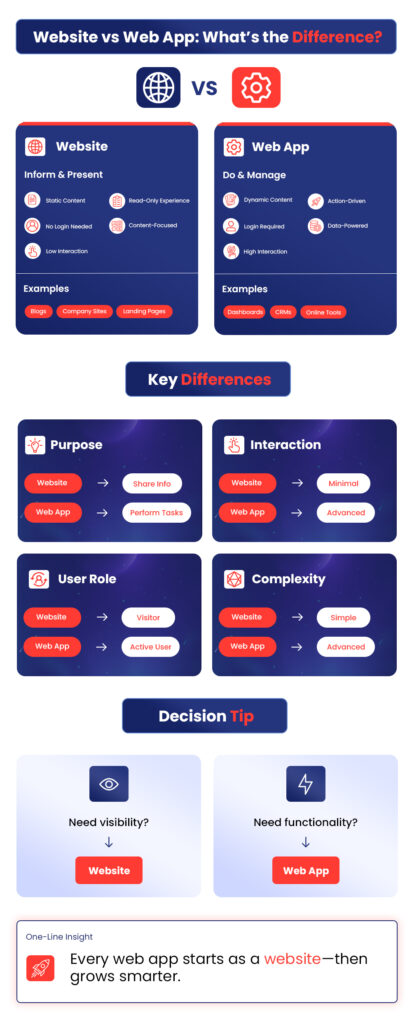
The easiest way to differentiate a web app from a website is by interactivity; websites share information while web applications allow interaction and functionality. A website represents an offer, while a web app lets you interact with it and do things such as book an appointment.
How are Web Applications Built?
In 2026, the main reason businesses choose web apps is that they are flexible, scalable, and accessible. Let’s find out how web applications are built step-by-step.
1. Discovery & Requirements
The first step is to understand the problem before trying to solve it through web app development. Your development team starts by collecting clear application goals, such as what the business wants to achieve and what success should actually look like after development.
Next are user stories. These are simple descriptions of how real users will use the product, what they need, and what problems they’re trying to fix.
User stories help the development team see the product from the user’s side.
After this, the team defines the core features. They don’t build everything at once, but they focus on what truly matters for the first version, such as the must-have features that make the app useful and usable.
This process results in the app’s business logic being mapped out. This means understanding how everything should work, including rules, workflows, approvals, and data flow. Getting this right early saves time and money.
2. Planning the Web Application
After clearly understanding the problem the app will solve (the business requirement), the second step shifts the focus to how and in what order the web app will be built.
First comes feature prioritization; not everything needs to be built at once, so features are ranked by importance. The must-haves come first and nice-to-haves later. This keeps the development team focused on the project and avoids delayed timelines.
Next is wireframing basic flows. These are simple visual layouts that show how a user will navigate the app, such as what they see first, what they will click next, and whatever actions they will take. The only purpose of this process is to clear the structure and flow.
Then the development team decides which technologies will be used for the frontend, backend, database, and hosting. The choice depends on the app’s goals, scalability needs, security, and future growth.
In the final stage of this step, the project is divided into clear phases with deadlines, such as development, design, testing, and launch.
3. UI/UX Design
In this step, the web app starts to look almost real because of the design. Before starting with any big-level development process, UI/UX design creates the blueprint users will actually interact with.
It usually starts with wireframes, which are simple layouts showing where things go. Then come mockups, adding colors, typography, and visual style. Finally, prototypes bring everything together into clickable screens that act like the real app.
The platform is designed for small screens first and then moves to big screens like tablets or desktops. This keeps the experience clean, fast, and usable everywhere.
This is also where design and development connect strongly. Clear layouts, reusable components, and well-defined interactions make development smoother, faster, and more consistent once coding begins in the next step.
4. Frontend Development
Frontend development is the part of a web application that users actually see and interact with. It includes everything on the screen, such as buttons, forms, layouts, animations, and how the app responds when someone clicks, types, or scrolls.
Simply put, the frontend is how the web app will look.
The frontend doesn’t work alone. It is connected to the backend, which handles data, logic, and security. When a user logs in, submits a form, or loads a dashboard, the frontend sends a request to the backend, the backend processes it, and then sends the right data back for the frontend to display. Neither frontend nor backend can function without the other.
At a high level, they all do the same job, like managing the user interface and updating the screen efficiently when data changes. React focuses on reusable components, Angular offers a more structured and all-in-one approach, and Vue stays in the middle for its job.
Build the Right Web App From Day One
Talk to DynamoLogic Solutions about your web app requirements today.
5. Backend Development
While many don’t realize it, the backend is what handles everything that manages every time something happens on the frontend. Backend development also includes databases, in which user accounts, content, transactions, and settings are saved and organized.
Whenever a user signs up, updates a profile, or loads data, the backend gathers the right information from the database and sends it back.
Including APIs, authentication, and payments. APIs are how the frontend and the backend connect with each other.
Authentication handles who can access what. It makes sure users are who they say they are and controls permissions after login. And payments are also managed in the backend. This includes handling subscriptions, one-time charges, invoices, and payment confirmations through trusted payment gateways.
That is why the backend is considered where logic, data, and security come together.
6. Integrations, Automation, and APIs
This step is about making the web app smarter and more connected to the outside world. Instead of doing everything on its own, the app plugs into tools that already do certain jobs really well.
Like, payment gateways handle online payments securely. They process cards, wallets, subscriptions, and refunds without the app ever storing sensitive financial data.
Email systems take care of communication. Things like signup confirmations, password resets, invoices, and notifications are automated, so users stay informed without manual effort.
Analytics tools track how users actually behave. They show what features are used most, where users drop off, and how the app is performing.
And third-party connections tie everything together. CRMs, ERPs, calendars, support tools, and other platforms can sync data through APIs.
7. QA Testing
This step builds trust because QA testing makes sure the web app feels solid, reliable, and safe before real users ever touch it. The web apps development team does manual testing to understand the user experience better. Testers click around, fill out forms, try different flows, and intentionally do things wrong or the hard way to see what breaks down. This helps catch confusing moments and small issues that automated tools might miss.
Sometimes, automated tests help check things at scale, which includes common actions like logging in, submitting forms, or loading pages, and are tested repeatedly to make sure nothing breaks when updates are made.
The QA testing phase also includes bug fixes and security testing. When issues are found, they’re fixed, retested, and checked again to make sure they don’t cause new problems elsewhere. And in the security testing stage, the team focuses on keeping user data safe by looking out for weak spots that could expose information.
8. Deployment
Deployment is the final step of the web application development process. Once the application is built, tested, and checked to ensure no issues are unsolved and the results are as expected, the web application is set to be live.
The machine where the application goes live is called the server. Servers store the app’s files, run the backend logic, and respond whenever someone opens the app in a browser.
Cloud platforms make the deployment much easier and more flexible because they allow you to run the app on cloud infrastructure that can handle traffic ups and downs. The domain is the app’s address on the internet, which is supposed to stay secure with the help of SSL (Secure Sockets Layer). SSL keeps the data encrypted, and the user information stays private and protected.
One more part of the deployment process, CI/CD, is an automated way to allow the made changes and updates to go live. For example, when a developer makes improvements or fixes bugs, those changes are tested and deployed smoothly without breaking the app or causing downtime.
9. Maintenance & Iteration
Once the application is launched, the main work is complete. However, it’s important to keep maintenance and sometimes iteration in the list. The app needs maintenance as per user needs, expectations, and feature needs advancement, and many other new changes are required to be made in the application based on users’ feedback and expectations.
This type of maintenance keeps the performance optimized, fast, and smooth. As DynamoLogic Solutions, we, as a web app development company, provide 24/7 technical support for 3 months straight after the launch without any extra or hidden costs to ensure everything is working smoothly as expected.
When to Choose a Web Application Instead of a Website
Many different businesses from different industries have different requirements. A web application doesn’t have to prove to be the best option for every business owner. To make a better and more informed decision, let’s compare both on strong criteria.
| Criteria | Website | Web Application |
|---|---|---|
| User Accounts & Login | Not required | Required (users can log in, manage profiles, and dashboards) |
| Type of Content | Mostly static (blogs, pages, company info) |
Dynamic (data changes based on user actions) |
| User Interaction Level | Low (read, scroll, contact form) |
High (forms, dashboards, workflows, tools) |
| Real-Time Updates | No | Yes (chat, live notifications, live tracking) |
| Data Processing | Minimal or none | Heavy (calculations, automation, reports) |
| Personalization | Same content for everyone | Content changes per user (roles, preferences) |
| Business Logic | Very limited | Core feature (rules, workflows, permissions) |
| Backend Complexity | Simple CMS or static backend | Advanced backend + APIs + database |
| Scalability Needs | Low | Medium to high (more users, more data) |
| Maintenance & Updates | Occasional content updates | Continuous feature & security updates |
| Examples | Company website, blog, landing page | CRM, booking system, SaaS tools, dashboards |
How DynamoLogic Solutions Supports Web Application Development
DynamoLogic Solutions has delivered 1200+ exceptional projects with leading industries all over the world for 17+ years, all while achieving a 98% client satisfaction rate.
As a professional web application development company, we do more than just write development code; we build both the frontend and backend together to create a seamless experience while ensuring smooth communication between what users see and how data is handled at the backend. Our approach to web app development involves several strong factors that ensure a strong and high-quality outcome.
- We build both what users see and what works behind the scenes.
- We plan, build, launch, and keep the app running smoothly.
- We connect the app to other tools like payments or CRMs.
- The app can grow easily as more users or features are added.
- We make sure the app is fast, secure, and easy to use.
- We update and improve the app as needs change over time.
Turn Your Idea into a Powerful Web App
Whether you’re planning a new platform or upgrading an existing system, DynamoLogic Solutions can help you build a web app that performs.
FAQs
1. How long does it take to build a web application?
Web application development usually takes from 2 to 12+ months. However, the fixed development time of a web application depends on your business requirements and scope.
2. How much does a web application cost?
Web application development cost depends on the choices you make before development, such as deep customization or advanced features. Roughly, it takes almost $1500 to $10,000 for a simple version and $100,000 for advanced versions.
3. What is the difference between web apps and mobile apps?
The big difference is that web apps run on browsers (almost like a website), but a mobile app needs to be installed on the device. Web apps are also cross-platform, update easily, and cost less to develop, while mobile apps are platform-specific, and some even offer offline access.
4. Do I need a custom web app for my business?
If your business needs a custom web app or off-the-shelf software, it totally depends on your business goals, requirements, and daily operations. Your business performs such tasks as a custom web app, which can offer you unique workflows, automate repetitive tasks, seamless data flow, better performance optimization, advanced features, and strong scalability.
5. What tools are used to build web applications?
Usually, tools like React, Vue, and Angular are used for frontend development. Node.js, Django, and Laravel for the backend development. MongoDB and PostgreSQL for databases. And some other advanced tools as per the development team’s needs and expertise.