A web application, or web app, is an application program that runs within a web browser, such as Chrome, Firefox, Safari, or Edge.
You probably use various web applications every day without even realizing it, such as when sending emails, booking appointments, managing documents, or making online payments.
While web applications and websites are often considered the same, there is a big difference between the two.
In this guide, you will understand what a web application is, how it works, its real-life examples, benefits, common use cases, and its types. Read on to learn more about when and why web apps are used and chosen.
Web Application vs. Website: What’s the Difference?
A web application is a software accessed through a web browser. Unlike mobile apps, web apps are not installed on a user’s device. Rather, they are accessible via a remote server.
While websites usually present information with basic interactions, web applications are more dynamic. They are used for task completion and are highly interactive. Secure logins, responsive designs, real-time updates, data processing capabilities, and AI optimization are some common features of web apps.
The table below will help you understand the difference between a website and a web application. It covers all the aspects and features to make it clear and understandable.
| Feature | Website | Web Application |
|---|---|---|
| Primary Purpose | To display information or content. | To perform tasks and allow user interaction. |
| Focus | Content consumption. | User actions & functionality. |
| User Interaction | Minimal (scrolling, clicking links). | High (forms, dashboards, workflows). |
| User Accounts / Login | Usually not required. | Almost always required. |
| Personalization | Same content for all users. | Personalized content for each user. |
| Data Handling | Rare or read-only. | Create, update, delete, and process data. |
| Dynamic Behavior | Mostly static. | Fully dynamic. |
| Backend Logic | Very limited or none. | Strong backend logic. |
| Examples of Actions | Reading articles & viewing services. | Booking, streaming, editing, and managing. |
| Real-Life Examples | Business website, blog, portfolio. | Netflix, Canva, online banking. |
| Technology Complexity | Simple. | Advanced. |
| Maintenance Level | Low. | High. |
| Security Needs | Basic. | High (user data, authentication). |
| Scalability | Limited. | Designed to scale. |
| Performance Dependence | Less dependent on the server. | Heavily dependent on the server. |
| Examples | Company site, landing page, news site. | CRM, ERP, and SaaS platforms. |
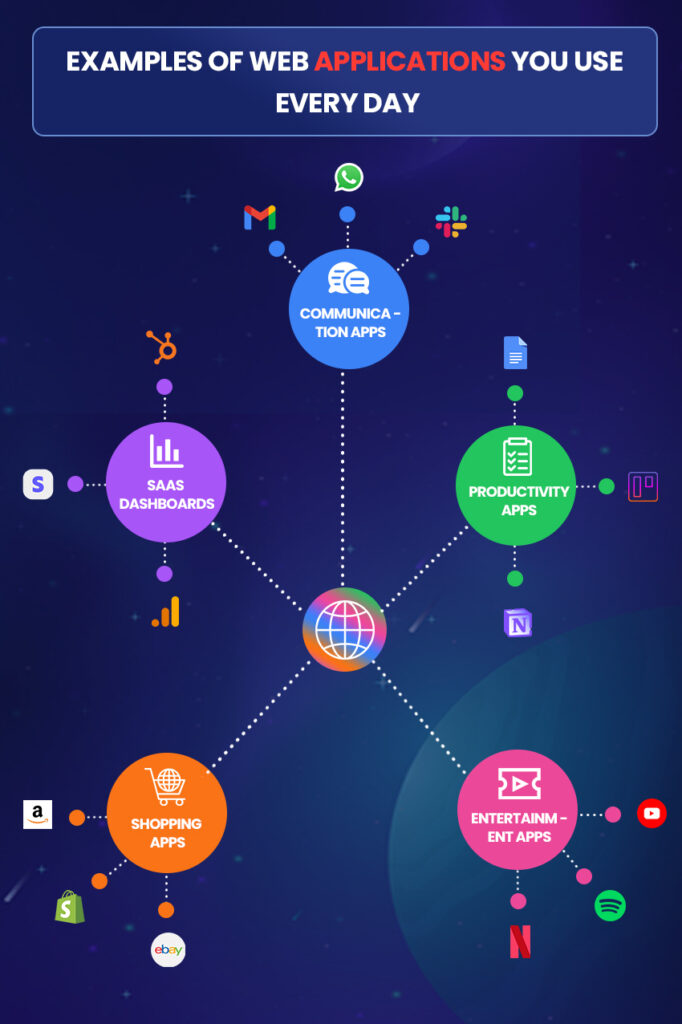
Examples of Web Applications You Use Every Day
How Do Web Applications Work?A web application is very different from a simple website. It lets users do things rather than just reading and scrolling. To put it simply, it’s a process that involves three main components: browser, server, and database.The first step is the browser, which is basically the frontend (what users see), such as websites, pages, buttons, forms, dashboards, and login screens. Whenever something is clicked, the browser sends a quick signal to the server to perform accordingly.The server is basically the brain of any web application. When the server receives a request from the browser, it understands what the user wants, checks rules, such as permissions, and then decides what the next step should be. For example, when you open Netflix, its server checks if you are logged in or if you have a subscription.The third main component is the database, which basically stores user accounts, passwords, payments, orders, messages, and even movies. When the server decides its next step, it directly asks the database the required questions, like, “Does this user have a subscription?” and database response back to the server using the stored data.Once the server gets data from the database, it prepares the result, formats it properly, and then sends it back to the browser, like “Yes, the user is allowed. Start streaming.” When the browser receives the final response, it starts displaying the content on the screen, updates pages without reloading, and responds instantly to user actions.This whole process hardly takes a few seconds and involves both frontend and backend.
Need a Custom Web Application?
DynamoLogic Solutions helps businesses design, build, and scale secure web applications tailored to their goals.
Key Components of a Web ApplicationA web application works when multiple parts work together. Each part has its own role and place. Let’s explore its components in a non-technical and clear way.1. Frontend (What users see)The frontend is the visible part of a web application, basically what you see after opening the application.
What It Does:
- Shows pages, buttons, forms, and dashboards.
- Let users click, type, scroll, and interact.
- Sends user actions to the backend.
- Displays results received from the server.
2. Backend (The Brain)The backend handles the backend of the web application, basically a decision maker of the response that will be sent to the frontend after a certain activity.
- Receives requests from the frontend
- Applies business rules and logic
- Checks permissions and user access
- Communicates with the database
- Sends results back to the frontend
3. API (The Messenger)API (Application Programming Interface) is the source of how the frontend and backend connect with each other.
- Carries requests from the frontend to the backend
- Sends responses back safely
- Allows different systems to connect
- Makes apps modular and scalable
4. Database (The Storage)The database stores all the information of the user, such as accounts, passwords, payments, and more.
- User accounts
- Passwords (securely)
- Orders, messages, files
- App content and settings
5. Authentication (User Identity & Security)Authentication work is to verify every user’s identity using credentials, like a password or biometrics.
- Handles login and logout
- Protects user accounts
- Controls access to features
- Keeps data secure
6. Hosting (Where the App Lives)Hosting is where the web application runs on the internet. It is strong and stores the application’s complete data on its servers.
- Servers to run backend code
- Storage for files and databases
- Internet access (24/7 availability)
- Performance, backups, and security
Types of Web Applications (Quick Comparison)The table below discusses each type of web application, with its meaning and example.
What Is Web Application Development?Web application development is the process of building websites that do more than show information; they let users log in, interact, and complete tasks online. In short, it’s almost like building interactive and functional online systems.What Do Developers Actually Build?To develop a web application, here are the things that developers build:
- Login and signup systems
- User dashboards
- Online booking systems
- E-commerce stores
- Admin panels
- Online tools (CRM, ERP, SaaS platforms)
When a web application performs well on the frontend and gets a correct response from the backend, it involves both the frontend and the backend. Both are important for a high-performing web application.Frontend (User Side)
- What users see and click
- Pages, buttons, forms
- Sends user actions to the server
- Shows results instantly
Backend (System Side)
- Processes user requests
- Applies rules and logic
- Handles logins and permissions
- Saves and retrieves data
How Do They Work Together?
This whole process only takes a few seconds and involves both the frontend and backend. It also involves using advanced tools for development, like React + Node.js, Laravel + Vue, and Django + JavaScript. This stack is used by developers to build data-heavy, admin-based, modern, and fast web apps with strong security.Benefits of Web ApplicationsThere are many benefits for both businesses and users who choose web application development. Let’s list down the top benefits:
- It can be accessed from anywhere on any device. All you need is the internet.
- No installation is needed from the app store or anywhere. It can be run on a browser using a simple URL.
- They are highly scalable, which makes them suitable for growing businesses.
- It is easy and efficient to use and maintain.
- They also offer cross-platform compatibility. It works on multiple operating systems, including Windows, macOS, Android, and iOS.
- Users always access the latest version, which also means there’s no need for manual updates.
- Web apps can handle increasing numbers of users and larger datasets by leveraging server resources and cloud technologies.
Common Use Cases for Web ApplicationsWeb applications are widely used by businesses to manage operations, users, and data online. One of the most common use cases is marketplaces, where multiple buyers and sellers interact on a single platform. These web apps handle product listings, user accounts, payments, and order management, which makes them important for e-commerce and service-based businesses.Another major use case is booking systems. These web applications allow users to check availability, make reservations, and receive confirmations in real time. They are commonly used in industries such as travel, healthcare, hospitality, and professional services.Not to forget, dashboards are also a core use case for web applications. Businesses use dashboards to view analytics, monitor performance, and track important metrics in one centralized place. These applications help decision-makers understand data quickly and act accordingly.The most common use of web applications is CRM (Customer Relationship Management systems). CRMs store customer data, track interactions, manage leads, and support sales and marketing workflows. Learning platforms are a growing use case for web applications as well. These platforms allow users to access courses, watch lessons, complete quizzes, and track progress online. Schools, training institutes, and companies rely on them for education and skill development.There is no doubt that web applications are the best choice for every business that wants interaction, automation, and real-time data management.
Looking for Expert Web App Development?
Partner with DynamoLogic for secure, scalable web application solutions.
FAQsIs Gmail a web application?Yes, Gmail is a leading example of a web application.What is the difference between a web app and a mobile app?A web app runs on a browser, needs internet, and updates automatically. In contrast, a mobile app can be installed from the app store and offers offline access.How do web apps store data?There are 2 storage systems that every web application uses to store data: server-side storage (database) and client-side storage, which is within the user’s browser.What technologies are used to build web applications?Advanced and modern technologies are used to build a web app, including React, Node.js, Laravel, Vue, Django, and JavaScript.Are web apps the same as SaaS?No, web apps and SaaS are not the same. A web app is basically software accessed via a browser, while SaaS (software as a service) is a specific delivery model.Why do companies choose web apps over native apps?
There are many valid reasons to choose a web app for your business, as it works on all types of devices, no app store is needed, it has a low development cost, and it is easy to maintain and update.
| Feature | Website | Web Application |
|---|---|---|
| Primary Purpose | To display information or content. | To perform tasks and allow user interaction. |
| Focus | Content consumption. | User actions & functionality. |
| User Interaction | Minimal (scrolling, clicking links). | High (forms, dashboards, workflows). |
| User Accounts / Login | Usually not required. | Almost always required. |
| Personalization | Same content for all users. | Personalized content for each user. |
| Data Handling | Rare or read-only. | Create, update, delete, and process data. |
| Dynamic Behavior | Mostly static. | Fully dynamic. |
| Backend Logic | Very limited or none. | Strong backend logic. |
| Examples of Actions | Reading articles & viewing services. | Booking, streaming, editing, and managing. |
| Real-Life Examples | Business website, blog, portfolio. | Netflix, Canva, online banking. |
| Technology Complexity | Simple. | Advanced. |
| Maintenance Level | Low. | High. |
| Security Needs | Basic. | High (user data, authentication). |
| Scalability | Limited. | Designed to scale. |
| Performance Dependence | Less dependent on the server. | Heavily dependent on the server. |
| Examples | Company site, landing page, news site. | CRM, ERP, and SaaS platforms. |
| Type | What It Means | Common Examples |
| Static Web Apps | Content rarely changes and is the same for all users. | Portfolio sites & simple info tools. |
| Dynamic Web Apps | Content updates based on user actions or data. | Blogs with comments & dashboards. |
| Single-Page Applications (SPA) | Loads once and updates without page reloads. | Gmail, Trello, Canva. |
| Multi-Page Applications | Loads a new page for each action. | E-commerce stores & admin panels. |
| E-commerce Apps | Built for buying and selling online. | Amazon, Shopify stores. |
| Progressive Web Apps (PWA) | Works like a mobile app in the browser. | Twitter Lite & food delivery apps. |