We use mobile apps every day; some are accessible without the internet, and some are not. Mobile apps like Facebook, Instagram, and LinkedIn are great examples of successful mobile app development. But, in the meantime, if you have ever been curious about how these apps are made, launched, and deployed, you will find out all this in this beginner-friendly guide.
Whether you are a business owner or simply want to explore more about mobile apps, you will find everything you need in this beginner-friendly mobile app development guide for 2026.
What Is Mobile App Development?
Mobile app development is the process of building Android or iOS applications that run on smartphones, tablets, and digital assistants. Developers may create native, hybrid, pr cross-platform mobile applications. Depending on the type, some apps can be used on devices even without an internet connection, while others can’t.
Mobile app development companies usually build applications for two operating systems: iOS and Android. iOS apps run on Apple devices such as the iPhone, iPad, and Apple Watch. In contrast, Android apps run on Android phones and tablets. Some of the common tools used to build an app are Swift, Kotlin, Flutter, Ionic, and React Native.
Types of Mobile Apps
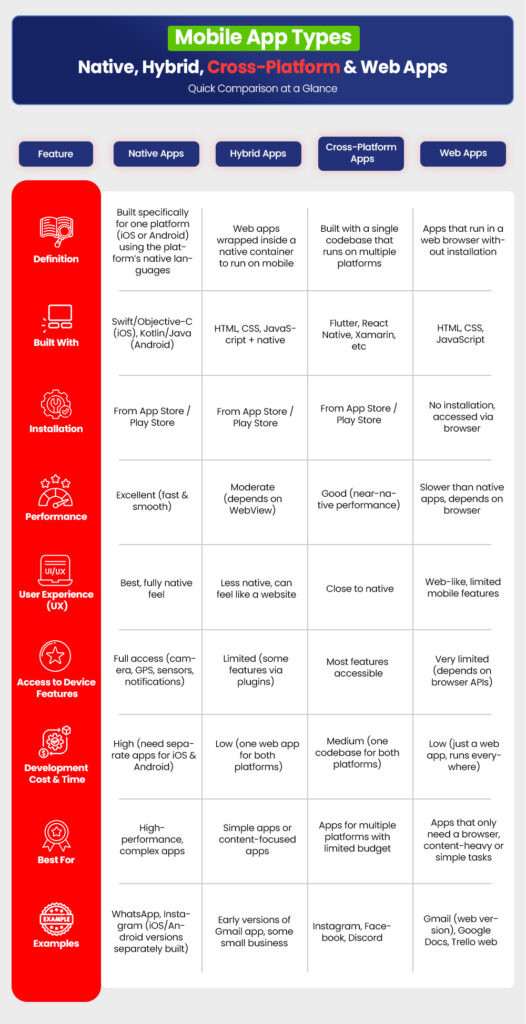
There are many types of mobile apps, and they differ depending on how they are developed. The types mainly fall into four categories: native, hybrid, web, and cross-platform apps:
1. Native Mobile Apps
A native app means a software application specifically built for a single platform, like iOS or Android. Native mobile app developers use programming languages such as Swift, Kotlin, and Java to build high-performing apps with deep integrations. Popular examples include WhatsApp and Google Maps (Android-only), and Apple Maps and FaceTime( iOS-only).
2. Hybrid Mobile Apps
Hybrid apps, as the name suggests, are exactly the opposite of Native apps. These apps can work on both Android and iOS devices. Hybrid apps are actually web apps wrapped in a native container. Built with technologies like HTML, CSS, and JavaScript, enabling them to be used on multiple platforms, not just one. While running on multiple platforms with a single codebase, hybrid apps still offer features like camera and GPS. Mobile apps like Uber and Gmail are popular examples.
3. Cross-Platform Mobile Apps
Just like hybrid apps, cross-platform apps run on multiple operating systems, such as iOS, Android, Windows, and macOS. Developers use a single codebase to create one app that runs on multiple platforms. Cross-platform mobile app developers write code only once, which saves time and cost. A leading example of this type is Instagram.
4. Web Apps
Web apps are those applications that don’t require installation. Unlike mobile apps, they don’t need to be downloaded from the App Store or Play Store. However, they’re not just a website, but a combination of both. Web apps run in a browser, just like a website, but they act like an app.
The main difference is the functions – websites are static while web apps are dynamic. You read things on websites while you do things on web apps. Trello and Canva are popular examples.
How Mobile App Development Works
Mobile app development companies usually follow clear and planned steps for smooth development while maintaining deadlines. While every project is a little different, each step takes a different time period for every development team.
1. Discovery
The purpose of the first stage, discovery, is to make things clear. The development team discusses what the app should do, who it is for, what problem it solves, and its basic goals, features, and expectations.
2. Wireframes
Wireframes mean sketching the app screen structure, such as button placement, its text, and different sections’ placement. This step helps the team understand the app structure before the development starts.
3. UI/UX Design
In this step, colors, fonts, and layouts are designed to clear UI/UX requirements and goals. Designers choose colors of sections, buttons, form designs, and everything else that includes UI and UX.
4. Backend & APIs
The backend of a mobile app handles things like user accounts, data storage, payments, passwords, and everything else that makes the frontend response better and faster.
APIs are a connection between the backend and frontend; their main job is to keep both ends connected and communicative. The API also decides what data can be requested, how to request it, and what response will be returned.
5. Frontend Development
The frontend means the main face of a mobile app that users see. Frontend development includes the development of layouts, animations, buttons, forms, and design, using core languages like HTML. The frontend lets users interact with the app through tapping, scrolling, and clicking.
6. Testing & QA
At this stage, almost all the development work is done. The testers and QA experts test the app to find bugs, crashes, or anything that does not work as required. The focus of this process is to make sure everything works smoothly and as expected.
7. Deployment
Deployment is the final step of mobile app development. Once everything is developed, tested, and ensured, the app is published to the App Store or Google Play so users can download it.
8. Maintenance
After launch, the app still needs updates and fixing. Some bugs need to be fixed, a few features need to be improved, and changes are required as user needs grow and the app scales.
Have an App Idea?
Explore our Mobile App Development services and see how we can turn it into a reality.
Mobile App Development Technologies
As mobile apps are developed usually for two platforms, Android and iOS, different tools and languages are used by the development team to build mobile apps as per the platform and project needs.
Swift
Swift is a high-performing programming language that is used to build native mobile apps for iOS, macOS, watchOS, and tvOS. Developers use Swift for its speed, safety features, and modern syntax.
Kotlin
Kotlin is an official programming language that is used to build mobile apps for Android devices. Over 95% of Android mobile app developers use Kotlin over Java for its strong benefits, as it offers modern features and safety.
Flutter
Flutter is a UI software development kit (SDK) used by mobile app developers to build native and multi-platform applications for both iOS and Android with a single codebase.
Ionic
Ionic is a UI toolkit used by development teams to build hybrid mobile, web, and desktop apps using advanced web technologies, like CSS and HTML.
React Native
React Native is an open-source UI software framework. It helps developers build cross-platform native mobile apps for iOS and Android by using technologies like JavaScript and the React Framework.
Benefits of Mobile App Development for Businesses
There are many options available for businesses to choose from, such as a web app, a website, and a mobile app. For better decision-making, let’s point out the benefits of mobile apps for businesses.
- Better customer engagement: Mobile apps are a better and easier option to stay connected with your users and customers through constant updates, notifications, and discounts.
- Automation: Handling tasks like bookings, payments, and updates is easy and can even be set to automation.
- Access to mobile users: 80% to 90% of recorded time on mobile is on apps, not the browser, which clearly shows that many users prefer a mobile app over a website or any other option.
- Monetization: It is easy and smart to run and generate income through subscriptions, ads, or in-app purchases through mobile apps.
- Push notifications: Mobile apps allow businesses to reach users instantly with updates, offers, and notifications.
- Competitive advantage: If your app is developed, designed, and targeted the right way, it can help businesses stand out in crowded markets for their target audience.
Common Use Cases for Mobile Apps
Here are the most common use cases for mobile apps that are used across almost every industry today.
- E-commerce – Shopping apps for browsing and buying products.
- Healthcare – Apps for appointments, health tracking, and consultations.
- Delivery apps – Food, grocery, and courier services.
- Booking platforms – Hotels, salons, events, and travel bookings.
- Fitness apps – Workout plans, tracking, and coaching.
- Educational apps – Online learning, courses, and skill-building.
- Finance apps – Banking, payments, budgeting, and investing.
Costs & Timelines: What Influences Them?
There are many factors that influence the cost and timeline of mobile app development. Main aspects include
- App complexity – Apps that require basic features are easier and cheaper to build than apps that require advanced features and integrations.
- Features – Specific and on-demand feature development, such as login systems, payments, and integrations, requires increased efforts, which also increases the timeline and cost of the development.
- Platform – Building for one platform, like just for Android or just for iOS, is cheaper than building for both.
- Development approach – Native app development usually costs more than hybrid or cross-platform app development.
When to Choose Native vs. Hybrid Development
When businesses should choose native and when hybrid app development depends on a few factors. Here’s a quick comparison to consider to make a better and more informed decision.
| Factor | Native Apps | Hybrid Apps |
|---|---|---|
| Cost | Higher | Lower |
| Performance | Better | Moderate |
| Time to market | Longer | Faster |
| Platform support | One platform | Multiple platforms |
How DynamoLogic Solutions Helps With Mobile App Development
DynamoLogic Solutions has been working on 1200+ exceptional projects with leading industries all over the world for 17+ years, all while achieving a 98% client satisfaction rate.
As a professional mobile app development company, we build native, hybrid, web, and custom mobile apps for iOS, Android, and cross-platforms. Our focus is always on building apps specifically according to business requirements and goals, and within budget. We also offer 24/7 technical support after the launch for 3 months straight without any hidden or extra costs.
What our team does for you:
- Translates business goals into app features
We don’t just take requirements at face value—we analyze your business model, revenue streams, and users to decide what features matter and what will only waste budget. - Validates ideas before heavy development
We help you avoid costly mistakes by validating flows, feature sets, and technical feasibility early (wireframes, MVP planning, and logic mapping). - Chooses the right tech stack (not what’s trendy)
Native, cross-platform, or hybrid—we recommend what’s best for performance, scalability, timeline, and long-term maintenance based on your business, not developer preference. - Design apps that users actually adopt
UX/UI is built around real user behavior: fast onboarding, minimal friction, clear CTAs, and retention-focused design—not just visuals. - Builds scalable, future-ready architecture
Your app is engineered to handle growth—more users, features, integrations, and data—without forcing a rebuild later. - Ensures performance, security, and stability
We optimize load times, secure APIs, protect user data, and test across devices to prevent crashes, leaks, and poor ratings. - Integrates with your existing systems
Payment gateways, CRMs, ERPs, analytics tools, third-party APIs—we make sure your app works smoothly within your current ecosystem. - Maintains transparency throughout development
Clear timelines, milestones, progress updates, and deliverables—no black-box development or surprise delays. - Delivers app-store-ready builds
We handle App Store & Play Store compliance, guidelines, testing requirements, and submission support to avoid rejections. - Provides post-launch support that actually helps
Bug fixes, performance monitoring, minor enhancements, and technical support for 3 months—no hidden costs, no abandoned projects. - Focuses on ROI, not just code
Every decision is made with user retention, monetization potential, and long-term business value in mind.
Turn Your App Idea into Reality
Explore our Mobile App Development services or book a free consultation today!
FAQs
1. What are the main stages of app development?
The main stages of any mobile app development are discovery, design, development, testing, launch, and ongoing updates. Each stage takes time as per the app’s requirements, features, and platform.
2. How long does it take to develop an app?
Generally, it takes 1 to 3 months for basic apps, 3 to 6 months for moderate apps, and 6 months to a year for advanced Android app development. For iOS, it takes 2 to 4 months for moderate and 4 to 7+ months for complex app development. However, the confirmed timeline depends on your requirements, on-demand features, and customization.
3. What technologies are used for mobile apps?
Usually, Android app developers use Kotlin and Java. iOS app developers use Swift and Objective-C. More technologies and programming languages are usually used by development needs as per platform needs and the team’s expertise.
4. What is the difference between iOS and Android development?
iOS apps are built for Apple devices, such as macOS, watchOS, and tvOS, while Android apps run on Android phones and tablets.
5. What’s the difference between native and hybrid apps?
The main difference is that the native apps are developed for specific platforms, either iOS or Android. And hybrid apps are developed to run on multiple platforms using a single codebase.
6. How much does mobile app development cost?
Generally, mobile app development costs start from a few thousand dollars for basic versions and $100,000+ for advanced versions. However, the perfect cost depends on factors like features, platform, and location.