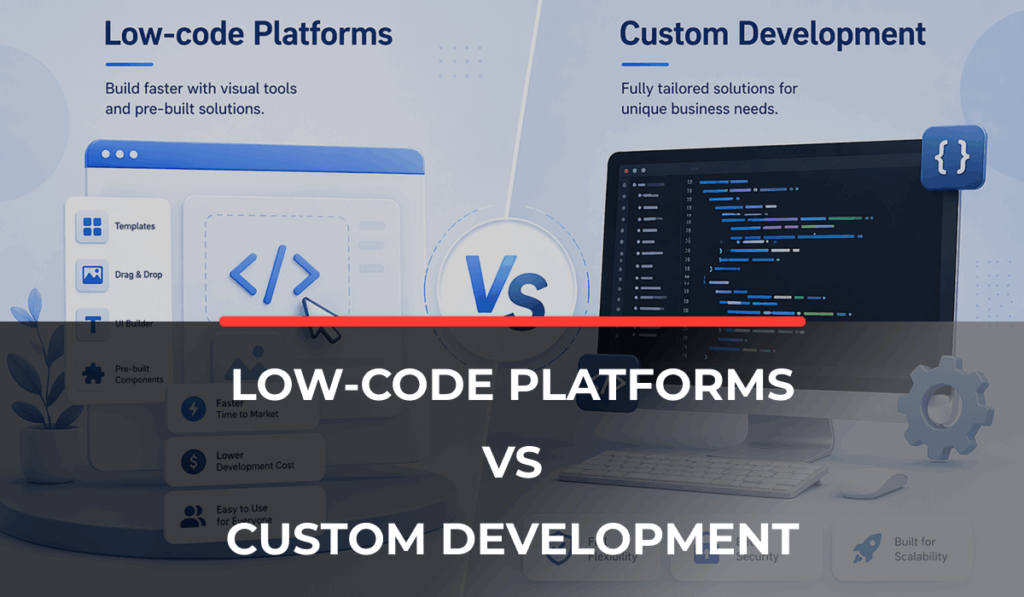
Low-code platforms vs custom development: which one is right for you? Low-code development is an alternative to custom software development. As the name suggests, it allows businesses to build their software quickly by using preset modules, drag-and-drop functionality, templates, and automated processes.
Low-code development is very attractive for early-stage companies or companies with a limited development budget. Since low-code platforms require minimal coding expertise or knowledge, non-technical staff can easily build new software without spending hundreds of dollars on custom development.
Weighing cost versus scalability, quick time-to-market versus well-tested, feature-rich platforms is confusing. There is no one answer; the choice of low-code platforms over custom software development solely depends on your business needs.
If you are exploring software development solutions, this comparison will make things clearer for you. This guide compares low code with custom development, helping you weigh the pros and cons.
What Are Low-Code Platforms?
Low-code platforms are tools that let you build software without writing code. Rather than starting from scratch, you use visual tools, drag-and-drop components, and ready-made building blocks. Platforms such as Microsoft Power Apps, Appian, Mendix, and OutSystems are popular examples.
Many businesses prefer low-code platforms in the initial stages as they reduce technical effort and make software creation more accessible, even for small teams. Simply put, a low-code platform allows you to build the software you want using drag-and-drop features instead of building everything from scratch.
Do you wish to add a login functionality? Simply drag and drop the login function from the platform, and you are good to go. There is no need to write code to build the function.
Common Use Cases of Low-Code Platforms
- Low-code platforms usually work best when the problem is simple and time-sensitive.
- They are commonly used for internal business tools where companies just want to manage data or operations without building a full system.
- They are also widely used for workflow automation, where repetitive tasks are simplified into structured steps.
- Another very important use is MVPs and prototypes. If a business just wants to test an idea quickly before investing heavily, low-code is a practical starting point.
Typical Workflow of Low-Code Platforms
1. Gather requirements and define basic business needs
Example: “We need a CRM dashboard.”
2. Choose a template to start the project
Select pre-built app template (CRM, ERP, form system, etc.)
Or start from a blank canvas
3. Drag-and-drop UI building
Add screens visually:
- Forms
- Tables
- Buttons
- Dashboards
4. Configure logic (no heavy coding)
Set rules like:
- “If form submitted →save data”
- “If status = approved →notify user”
5. Connect data sources
Link to:
- Built-in database
- Excel / Google Sheets
- APIs
6. Add integrations (optional)
Email, payment gateways, CRM tools, etc.
7. Test inside the platform
Preview instantly in the browser
8. Deploy
One-click publish:
- web app
- mobile app
- internal tool
9.Continuous updates
Change UI or logic anytime (no redeployment complexity)
What Is Custom Software Development?
Custom software development is a completely different approach. Here, the software is built from scratch based on your exact business requirements, goals, and needs. Nothing is ready-made or limited by templates. Everything is designed specifically around how your business works, what your users need, and how your processes are structured.
The reason most companies prefer the custom software development route is that they want full control and software that adjusts to their business.
Common Use Cases
- Custom development is usually chosen when businesses have more complex needs.
- It is commonly used for enterprise systems where multiple departments need to work together. It is also widely used in a scalable SaaS platform where growth and performance are important from day one.
- Another major use case is complex integrations, where the software needs to connect with multiple systems, APIs, or third-party tools without limitations.
Typical Workflow of Custom Software Development
1. Requirement gathering & analysis
Deep documentation:
- User stories
- System requirements
- Workflows
- Architecture planning
2. System design
- UI/UX wireframes
- Database schema design
- System architecture (backend + frontend)
3. Development phase
Split into layers:
Frontend
- React / Angular / mobile app
Backend
- Apis, business logic
Database
SQL / noSQL setup
4. Integration
- Payment systems
- Third-party apis
- Authentication systems
5. Testing
- Unit testing
- Integration testing
- QA testing
- Performance testing
6. Deployment
- Servers (AWS, Azure, etc.)
- CI/CD pipelines
- Production environment setup
7. Maintenance & scaling
- Bug fixes
- Feature updates
- Scaling infrastructure
Choosing between Low-Code Platforms and Custom Development?
Not sure whether low-code or custom development fits your business? Get a clear direction based on your goals, budget, and scalability needs before you commit.
Key Differences Between Low-Code & Custom Development
When you compare custom vs template-based website development, the difference becomes clearer once their behavior is observed. Low-code focuses on speed and simplicity. You can build faster, but you stay within the limits of the platform. Custom development focuses on control and flexibility, but it takes more time and planning.
In terms of scalability, low code works well for smaller systems, but it can struggle when complexity increases. Custom development is built with growth in mind, so it can handle scale better.
Cost is another big difference. Low-code usually has a lower upfront cost but ongoing subscription fees. Custom development requires more investment at the start but usually delivers better long-term value.
Maintenance also differs. Low-code platforms handle most updates for you, while custom systems need dedicated technical support. Lastly, technical expertise is equally important. Low-code reduces dependency on developers, while custom development requires skilled engineering teams.
Pros & Cons of Low-Code Platforms
Pros:
- Faster development timelines that help businesses launch ideas quickly.
- Lower initial cost, which makes it easier for startups or small teams to begin building software.
- Easier modifications for simple use cases where changes are frequent but not complex.
- Reduced dependency on large development teams, which helps non-technical teams stay involved.
Cons:
- Limited customization, which can become a problem when your business needs specific features.
- Vendor lock-in risks because you depend heavily on the platform you choose.
- Performance constraints occur when the applications become too complex or data-heavy.
- Scalability challenges appear as your business grows beyond basic use cases.
Pros & Cons of Custom Development
Pros:
- Full flexibility and control over every feature and workflow in your system
- Scalable architecture that is designed to grow with your business needs.
- Better performance for complex systems that require high reliability.
- Customized workflows that match your exact business operations instead of forcing changes.
Cons:
- Higher upfront cost because everything is built from scratch by developers.
- Longer development time before you can actually launch the product.
- Requires experienced development teams to plan, build, and maintain the system properly.
Cost Comparison: Low-Code vs. Custom Development
It is important to look beyond just the starting price. Low-code platforms usually look affordable and cheaper at the beginning because they follow subscription-based pricing. You pay monthly or yearly, depending on usage.
Custom development requires a higher initial investment because the system is built completely from scratch. But the real difference becomes clear when you break it down:
| Cost Factors | Low-Code Platforms | Custom Development |
|---|---|---|
| Licensing Costs | Monthly or yearly subscription fees | No platform dependency costs |
| Development Costs | Lower initial effort due to ready-made tools | Higher due to a full custom build |
| Maintenance Costs | Mostly handled by the platform | Managed by your development team |
When to Choose Low-Code Platforms
Low-code is about solving simpler problems faster. It is ideal to choose a low-code platform when:
- You need rapid prototyping or MVP development to test an idea quickly.
- Your budget is limited, and you want to avoid a heavy upfront investment.
- You are building simple workflows or internal tools without complex logic.
- You need to launch something quickly without long development cycles.
When to Choose Custom Development
Custom development becomes a better choice when your business starts requiring more control and depth. For example, businesses requiring scalability often move toward custom CRM development services instead of low-code tools.
Choose custom development when:
- Your business has complex logic that cannot fit into templates or fixed workflows.
- You need strong scalability and long-term performance stability.
- You require integration with multiple systems and external platforms.
- You are building a long-term product that will grow over time.
Scalability & Long-Term Impact
Low-code platforms usually work well in the beginning, but as usage increases, businesses start noticing limitations in flexibility and performance. However, custom systems are built with growth in mind, so they handle expansion more smoothly as your business updates.
Security & Compliance Considerations
Low-code platforms handle security within their own ecosystem, which is convenient but also limits your control. Custom software allows you to design security based on your exact requirements, which is especially important for enterprise-level compliance and sensitive data handling.
Integration Capabilities
Low-code tools offer integrations, but they are usually limited to what the platform supports. Custom development gives you full API-level flexibility, which means you can connect any system, tool, or service without restrictions.
Hybrid Approach: Combining Low-Code & Custom Development
Many companies actually use a combination of both approaches. They use low-code platforms for internal tools, quick workflows, or simple automation tasks. At the same time, they invest in custom development for their core systems where performance, scalability, and control really matter.
The hybrid approach gives a balanced result where businesses save costs in simple areas while still building strong foundations for long-term growth.
How to Decide the Right Approach for Your Business
Choosing between low-code and custom development becomes easier when you look at your business practically.
- Define your business goals clearly and what you actually want to achieve.
- Evaluate how complex your workflows and systems are in real life.
- Compare your budget with long-term return instead of just upfront cost.
- Check your technical resources and whether you have support for scaling.
Most importantly, select the right software development partner. A sincere partner will give you sound advice and deliver the product you want.
Final Thoughts: It’s Not About Better; It’s About Fit
There is no universal winner in this comparison, and that is the most important thing to understand. Low-code platforms and custom development both have strong use cases, but they solve different types of problems. One focuses on speed and simplicity, while the other focuses on control and long-term scalability.
The best decision always depends on your business stage, your goals, and how far you plan to scale. When you choose based on fit instead of trends, the outcome is always more stable and practical.
Build the Right Software Foundation
Choose an approach that supports your long-term growth, not just your immediate needs. Let’s help you identify the best-fit solution for your business.
FAQs
What is the difference between low-code and custom development?
Low-code and custom development mainly differ in how software is built. Low-code platforms use ready-made components and visual tools, so you can build applications quickly with minimal coding. Custom development means building software from scratch based on your exact business needs.
Are low-code platforms better than custom development?
Not specifically. It depends on what your business actually needs. Low-code platforms are better when you want to build something quickly, like a simple internal tool or MVP. But if your system is complex and needs long-term growth, custom development is usually the better option.
When should you use low-code platforms?
You should use low-code platforms when speed and simplicity matter more than deep customization. For example, if you are testing a business idea, building a basic workflow tool, or creating an internal dashboard, low-code works well. It is also useful when your budget is limited.
What are the limitations of low-code development?
Low-code development is convenient, but it does have some limitations. You may face restrictions when you need advanced customization or complex workflows. It can also become difficult to scale as your application grows.
Is custom software development expensive compared to low-code?
Yes, custom development usually costs more at the beginning because everything is built from scratch. You need planning, design, and experienced developers to create the system.
Can businesses in Abu Dhabi benefit from custom software solutions?
Yes, definitely. Many businesses in Abu Dhabi deal with complex operations, multiple systems, and fast growth requirements. Custom software helps them build solutions that match their exact workflows and compliance needs.
Do I also need a web design agency for my software or platform?
Yes, in most cases, a strong UI/UX plays a key role in user adoption and overall product success. Working with a reliable web design agency in Abu Dhabi ensures your software or platform is not only functional but also visually intuitive and user-friendly, improving engagement and usability.