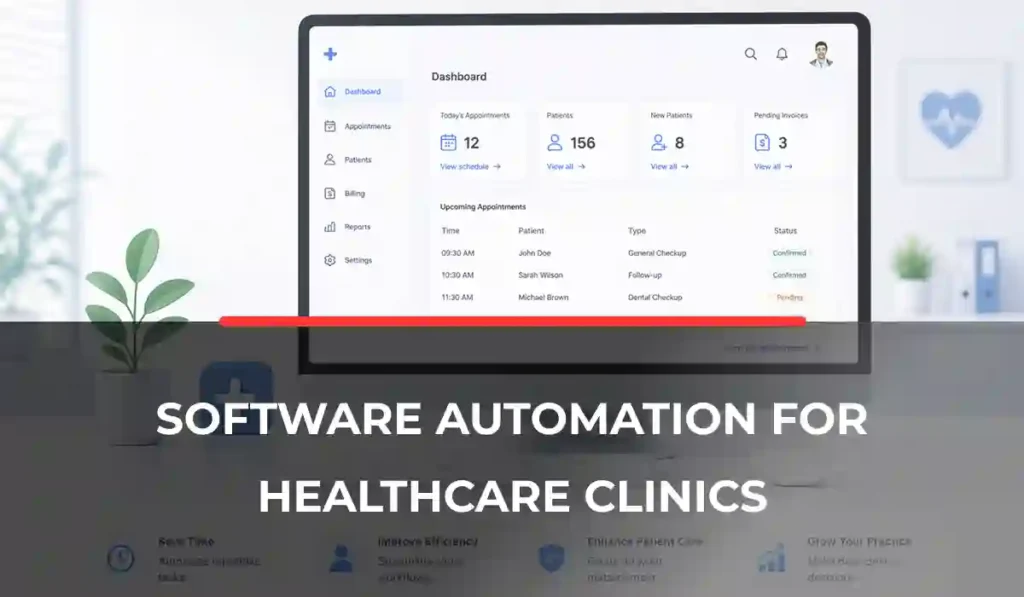
Healthcare clinics face many daily challenges, including managing appointments and patient records, and handling billing and administrative tasks. Software automation helps reduce manual work, improve accuracy, and streamline workflows. This allows healthcare staff to save time, enhance patient experiences, and focus more on delivering quality care.
What is Software Automation for Healthcare Clinics?
Software automation for healthcare clinics is like a digital assistant for your clinic; one that never sleeps, never makes careless mistakes, and handles the repetitive tasks that consume your staff’s valuable time. At its core, it’s the use of smart digital software and intelligent workflows to automate routine administrative, operational, and even clinical processes.
Unlike traditional clinic software that primarily stores information, automation platforms actively execute workflows, send notifications, synchronize data, and trigger actions automatically. These platforms, which can be healthcare CRMs or ERPs, automatically trigger workflows, synchronize data between systems, and ensure everything runs smoothly without constant manual intervention.
To understand how these systems are properly structured and delivered, it’s important to look at the planning stage of software projects, including requirements, architecture, and execution. If you want to read more about successful software project development, read our blog, “how to plan a successful software development project.”
So, what does this look like in practice?
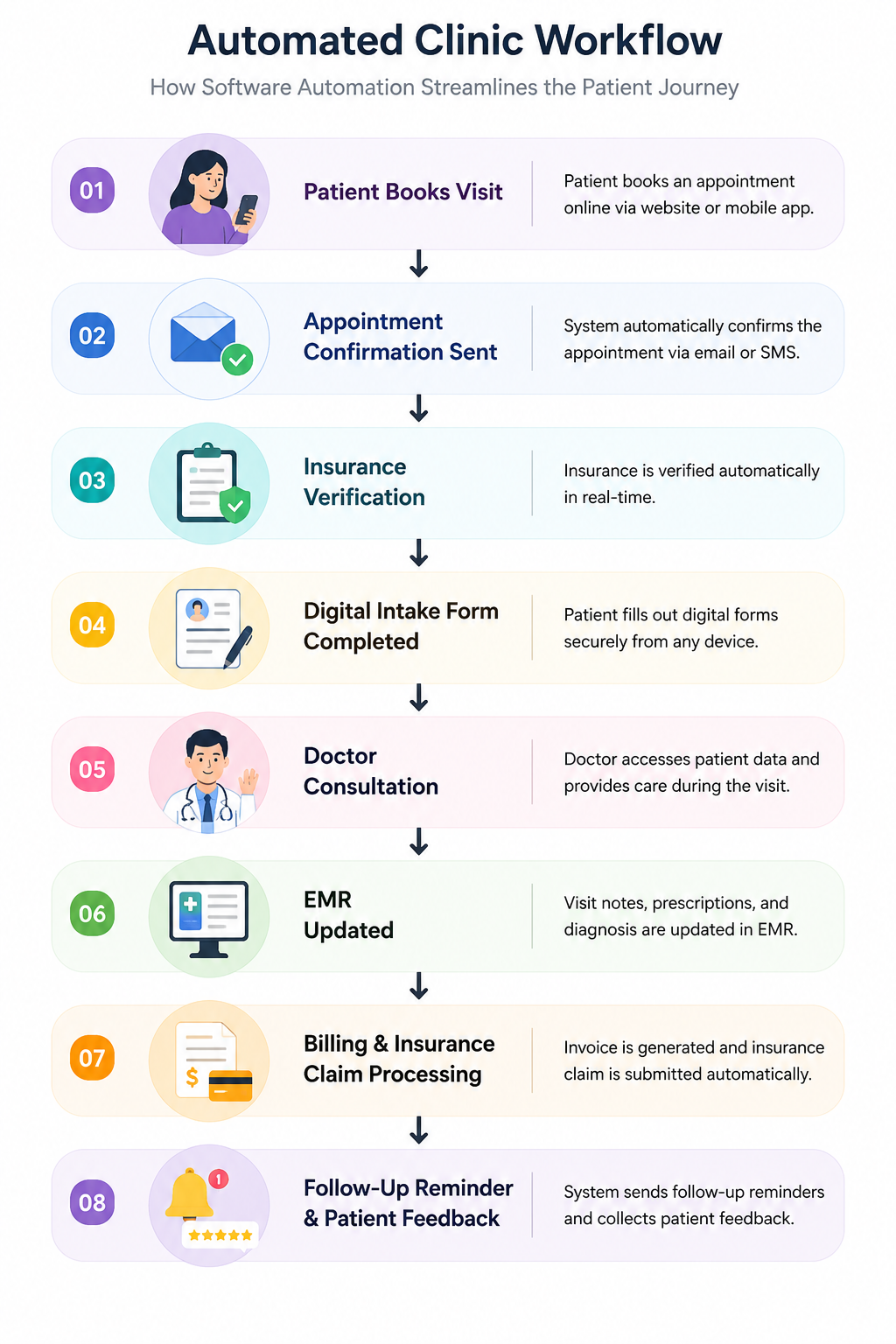
Imagine a patient books an appointment online. The system automatically checks the doctor’s availability, sends a confirmation email, adds the appointment to the calendar, and triggers a reminder 24 hours before the visit.
On the day of the appointment, the system verifies insurance coverage, sends the patient a digital intake form to fill out form home, and alerts the front desk that the patient is on their way.
After the visit, the system updates the electronic medical record, generates a bill, and submits the insurance claim, all without anyone lifting a finger. It ties together every part of the clinic’s operations so information flows effortlessly between scheduling, clinical care, billing, and communication.
WORKFLOW
Key Features of Healthcare Automation Software
1. Patient Management System
- Centralizes all patient data in one place, including registration details, demographics, treatment history, consent forms, and follow-up records
- Gives providers instant access to accurate, up-to-date patient information at the point of care
- Eliminates the need to search through paper files or toggle between multiple systems
- Reduces duplicate records and ensures data consistency across the clinic
- Simplifies patient check-in with pre-filled forms and quick access to existing information
2. Appointment Scheduling Automation
- Enables 24/7 online booking so patients can schedule appointments anytime, from any device
- Sends automated appointment reminders via text, email, or voice to reduce no-shows and last-minute cancellations
- Manages waitlists intelligently by automatically offering open slots to patients on the list
- Syncs with provider calendars in real-time to prevent double-booking and scheduling conflicts
- Allows patients to reschedule or cancel appointments without calling the front desk
- Provides visibility into appointment demand and provider availability for better capacity planning
- Modern appointment scheduling software for clinics allows patients to book visits online, receive automated reminders, and reschedule appointments without contacting the front desk.
- Integrates with billing and EMR systems so patient visits flow seamlessly from booking to check-out
3. EMR Integration
- Digitally stores all patient health information, including diagnoses, medications, test results, treatment plans, and progress notes
- Provides real-time access for authorized healthcare professionals from any location
- Improves documentation accuracy with structured templates and automated data entry
- Automatically updates records when lab results, prescriptions, or referrals come in
4. Billing and Insurance Automation
- Automates invoice generation with accurate coding and itemized charges based on services provided
- Verifies insurance eligibility instantly before the patient even arrives for their appointment
- Submits electronic claims to insurance companies with minimal manual effort
- Tracks claim status in real-time and flags denials or rejections for quick resolution
- Manages payment tracking and sends automated payment reminders to patients with outstanding balances
- Tracks the entire revenue cycle from patient check-in to final payment.
- Reduces billing errors by eliminating manual data entry and duplicate work
- Provides clear statements to patients to reduce confusion and disputes
5. Workflow Automation in Clinics
- Coordinates activities across departments to ensure nothing falls through the cracks.
- Manages referral workflows by automatically sending patient records and notifications to specialists
- Sends real-time lab result notifications to providers and patients when results are ready
- Automates prescription approvals by routing requests to the right provider for electronic signatures
- Assigns tasks to specific staff members and tracks completion status
- Creates escalation workflows that trigger alerts when tasks are overdue or critical
Explore Healthcare Automation Solutions
Discover how custom software automation can streamline your clinic’s workflows, reduce administrative burden, and improve patient care with tailored, scalable solutions built for healthcare providers.
How Software Automation Reduces Administrative Burdens for Healthcare Clinics
Software automation development helps healthcare clinics significantly cut down administrative workload by streamlining tasks like scheduling, billing, and documentation while improving patient experience, speeding up workflows, and reducing costly human errors through connected, real-time systems.
1. Reduced Administrative Workload
Administrative tasks consume a large portion of your staff’s time. Your front desk team spends hours making reminder calls, your billing staff manually verifies insurance for every patient, and your nurses chase down paperwork instead of caring for patients. Instead of your receptionist making 50 reminder calls a day, the system automatically sends texts and emails.
2. Improved Patient Experience
Patients today expect convenience. They want to book appointments on their phone at midnight, fill out forms before they even arrive, get text reminders so they don’t forget, and access their records through a patient portal.
If a patient books an appointment online at 10 PM, the system sends a confirmation, adds it to the calendar, and triggers a reminder 24 hours before the visit. On the day, they get a digital intake form on their phone, fill it out in five minutes, and walk in ready to see the doctor.
3. Faster Workflows
When systems are connected, information flows instantly. Doctors don’t wait for paper charts. Nurses don’t chase down lab results. Billing doesn’t wait for completed notes. Everyone gets real-time access to what they need. A patient’s lab results come in. The system automatically notifies the doctor, updates the medical record, and sends a follow-up reminder to the patient, all within minutes.
4. Reduced Errors
Manual processes are prone to errors, including typos in patient names, incorrect billing codes, double-booked appointments, and missing signatures. Automation drastically reduces these errors by handling data entry, validation, and routing.
If a patient’s insurance information is entered once and verified automatically, the system catches missing fields. It also flags expired coverage and ensures claims are submitted with the right codes. The result is fewer claim denials, faster payments, and fewer patient complaints related to billing mistakes.
Benefits Of Software Automation for Healthcare Clinics
1. Better Resource Allocation
- Gives administrators clear visibility into staffing needs, appointment demand, and clinic performance
- Helps balance schedules so no one is overbooked or underused
- Uses real data to guide decisions about hours, staffing, and capacity
2. Improved Staff Productivity
- Takes routine tasks like scheduling, reminders, and reporting off your team’s plate
- Frees up nurses and receptionists to focus on patients instead of paperwork
- Reduces burnout by eliminating repetitive, boring, busywork
3. Better Patient Retention
- Keeps patients coming back with convenient digital experiences
- Sends friendly reminders so appointments and follow-ups never slip through the cracks
- Gives patients access to their records and messages through a patient portal
4. Reporting
- Provides live dashboards showing exactly what’s happening in the clinic
- Tracks key metrics like wait times, no-shows, revenue, and productivity
- Spots bottlenecks early, so problems get fixed fast
5. Multi-Factor Authentication
- Requires two or more verification methods to access the system
- Adds extra protection beyond just usernames and passwords
- Stops unauthorized access even if passwords are stolen
6. Audit Trails
- Keeps a detailed log of who accessed what and when
- Provides a complete record for compliance audits
- Creates accountability by tracking all system activity
7. Data Backup and Recovery
- Automatically backs up patient data on a regular schedule
- Allows quick recovery from system crashes or cyberattacks
8. Cybersecurity Risk Management
- Includes ongoing monitoring to catch threats early
- Conducts regular vulnerability assessments to find weaknesses
- Trains employees on security best practices
While these benefits highlight the impact of software automation, achieving them successfully depends on proper planning, architecture, and execution during development. Many projects fail when businesses overlook foundational development principles, as explained in our guide on common software development mistakes businesses make.
Industry Trends Driving Automation
Healthcare organizations everywhere are pouring money into digital transformation, and for good reason. The pressure is mounting, with workforce shortages, rising patient expectations, and ever-increasing regulations, forcing clinics to find smarter ways to operate.
Industry leaders, such as WHO, HIMSS, McKinsey, and HealthIT.gov, all point to the same conclusion: healthcare automation is becoming essential for improving efficiency, patient care, and operational resilience.
That’s a huge jump from just a decade ago and shows just how central digital systems have become to healthcare operations. McKinsey’s research backs this up, suggesting that automation can significantly boost productivity by cutting down the hours staff spend on repetitive administrative tasks.
The World Health Organization (WHO) echoes this, emphasizing that digital health technologies are critical for strengthening healthcare systems, expanding access to care, and delivering better patient outcomes. And HIMSS continues to highlight analytics and workflow automation as top priorities for healthcare organizations, pushing for digital transformation.
So, what’s driving all this? For starters, clinics are struggling to keep up with demand amid staff shortages. Automation helps fill the gap by handling the busywork so providers can focus on patients.
At the same time, patients expect more convenience and faster service than ever before, and automation delivers that. Then there’s the shift toward value-based care, where providers are rewarded for patient outcomes rather than the number of services they deliver.
Ready to Transform Your Clinic Operations?
From appointment scheduling and EMR management to billing and patient communication, healthcare automation can eliminate repetitive tasks and improve efficiency across your entire practice. Explore how clinics of all sizes are using automation to reduce costs, increase productivity, and deliver a better patient experience.
Use Cases of Clinic Automation Systems
1. Small Private Clinics
Small clinics often have limited staff, so everyone wears multiple hats. Automation helps by handling scheduling, billing, patient communication, and record management so providers can spend more time with patients. The best part? It keeps things personal and efficient at the same time.
For example, a solo practitioner uses automated appointment reminders and digital intake forms so patients can book online, fill out paperwork before they arrive, and get text reminders. The result? The doctor sees more patients without needing to hire extra administrative staff.
2. Multi-Specialty Clinics
When you have multiple specialties under one roof, coordination can get messy. Many healthcare organizations integrate clinic automation platforms with hospital management system software to create a unified ecosystem.
Automation makes sure information flows between departments so everyone stays on the same page. It standardizes processes across the board, reducing confusion and improving patient care.
Take a patient who sees a cardiologist and then gets referred to a dietitian. The system automatically shares records, schedules the follow-up, and notifies both providers; no phone calls, no lost paperwork, and no unnecessary delays.
3. Diagnostic Laboratories
Labs deal with a lot of moving pieces, test scheduling, sample tracking, result reporting, and quality control. Automation keeps everything organized and running on time by tracking samples from arrival to results, so nothing gets lost or delayed.
For instance, a lab that receives hundreds of samples daily assigns a barcode to each one, tracks it through every step, and automatically sends results to the referring doctor. If a sample is held up, the system flags it immediately so problems can be fixed fast.
4. Outpatient Facilities
Outpatient clinics see a steady stream of patients for procedures, therapy, or follow-ups. Automation streamlines the entire patient flow, from check-in to check-out, so wait times decrease and documentation improves.
Patients get in and out faster, and staff spend less time chasing paperwork. For example, patients check in on a tablet, the system updates the provider, and the patient is called in within minutes. After the visit, notes are automatically saved, and follow-ups are scheduled.
5. Telemedicine-Enabled Clinics
Virtual care comes with its own challenges, such as managing appointments, collecting intake forms, documenting visits, and following up. Automation handles these tasks, allowing patients to book online, complete forms digitally, and receive reminders before their virtual visit.
After the appointment, the system updates the record and sends follow-up messages. Consider a patient who schedules a virtual consultation through the portal. The system sends a link, collects symptoms beforehand, and the provider sees everything before the call. After the visit, a summary and next steps are automatically sent to the patient.
Quick Comparison: Manual Vs Automated Clinic Operations
<thwidth=”286″>Manual Clinic OperationsAutomated Clinic Operations
| Process | Manual Clinic Operations | Automated Clinic Operations |
|---|---|---|
| Appointment Scheduling | Phone calls and spreadsheets | Online booking and reminders |
| Patient Records | Paper files | EMR access |
| Billing | Manual claims | Automated billing |
| Communication | Calls and emails | Automated notifications |
| Staff Coordination | Meetings and manual updates | Workflow automation |
| Reporting | Manual reports | Real-time dashboards |
Conclusion for Software Automation for Healthcare Clinics
Software automation helps healthcare clinics save time, reduce errors, and improve patient care by handling routine tasks efficiently. As healthcare continues to grow more complex, clinics that adopt automation will be better prepared to serve more patients, stay compliant, and grow successfully.
Ready To Future-Proof Your Healthcare Clinic with Smart Automation?
Whether you need custom healthcare automation software, EMR integration, workflow automation, or complete healthcare IT solutions, DynamoLogic Solutions has you covered.
We build systems that actually work for your clinic, not the other way around. From small private practices to large multi-specialty clinics, we create tailored solutions that fit your needs, your budget, and your patients.
FAQs
What is software automation for healthcare clinics?
It is the use of digital technologies to automate administrative, operational, and clinical processes within healthcare facilities.
How does clinic automation software work?
It integrates scheduling, records, billing, communication, and workflow tools into a unified platform that automates routine tasks.
What are the benefits of healthcare automation software?
Benefits include improved efficiency, reduced costs, enhanced patient experiences, better data accuracy, and stronger compliance.
Is clinic management software secure?
Modern solutions use encryption, access controls, audit logs, and compliance frameworks such as HIPAA and GDPR.
What is EMR in healthcare software?
An EMR is a digital record system that stores and manages patient health information.
How much does healthcare automation software cost?
Costs vary based on clinic size, customization requirements, integrations, deployment model, and vendor selection. Small clinics may adopt subscription-based platforms, while larger healthcare organizations often invest in custom automation solutions.