Many businesses think their software budget ends the moment the app goes live. But that is not true. Once your software launches, you still need to spend money to keep it working well.
This includes keeping it:
- Secure
- Available
- Monitored
- Supported
- Updated
- Ready to grow
- Compatible with new devices and systems
All of these ongoing costs are part of what is called the total cost of ownership (TCO).
In simple terms: the cost of custom software isn’t just about designing and building it. You also need to pay to operate, maintain, protect, support, and improve it over time.
If you’re still figuring out what it costs to build your application in the first place, our guide on custom software development cost covers that side in detail. This article picks up where that one leaves off; it focuses on what you’ll keep paying for once your software is live.
This article will help you understand what custom software maintenance really costs, what it includes, and how to plan a smart budget for it.
How Much Does Custom Software Maintenance Cost?
This is one of the most common questions businesses ask once development wraps up: how much does it cost to maintain custom software every year? No single price fits every business. Maintenance costs vary depending on the software and its requirements, such as:
- How complex your software is
- How many users it has
- What kind of infrastructure it needs
- How many integrations it uses
- How strict your security needs are
- How often you need updates
- What kind of support you need
- What technology it is built with
- How much it needs to scale
- What level of service you expect
Because of all these factors, it is hard to give one fixed number, and many businesses look for software maintenance costs as a percentage of development costs, hoping for a simple rule.
In truth, that percentage can shift a lot depending on your software. A small internal tool may need very little maintenance. A large platform with thousands of users may need a much bigger ongoing budget. The best way to know your real cost is to look closely at what your specific software depends on.
What Does Custom Software Maintenance Include?
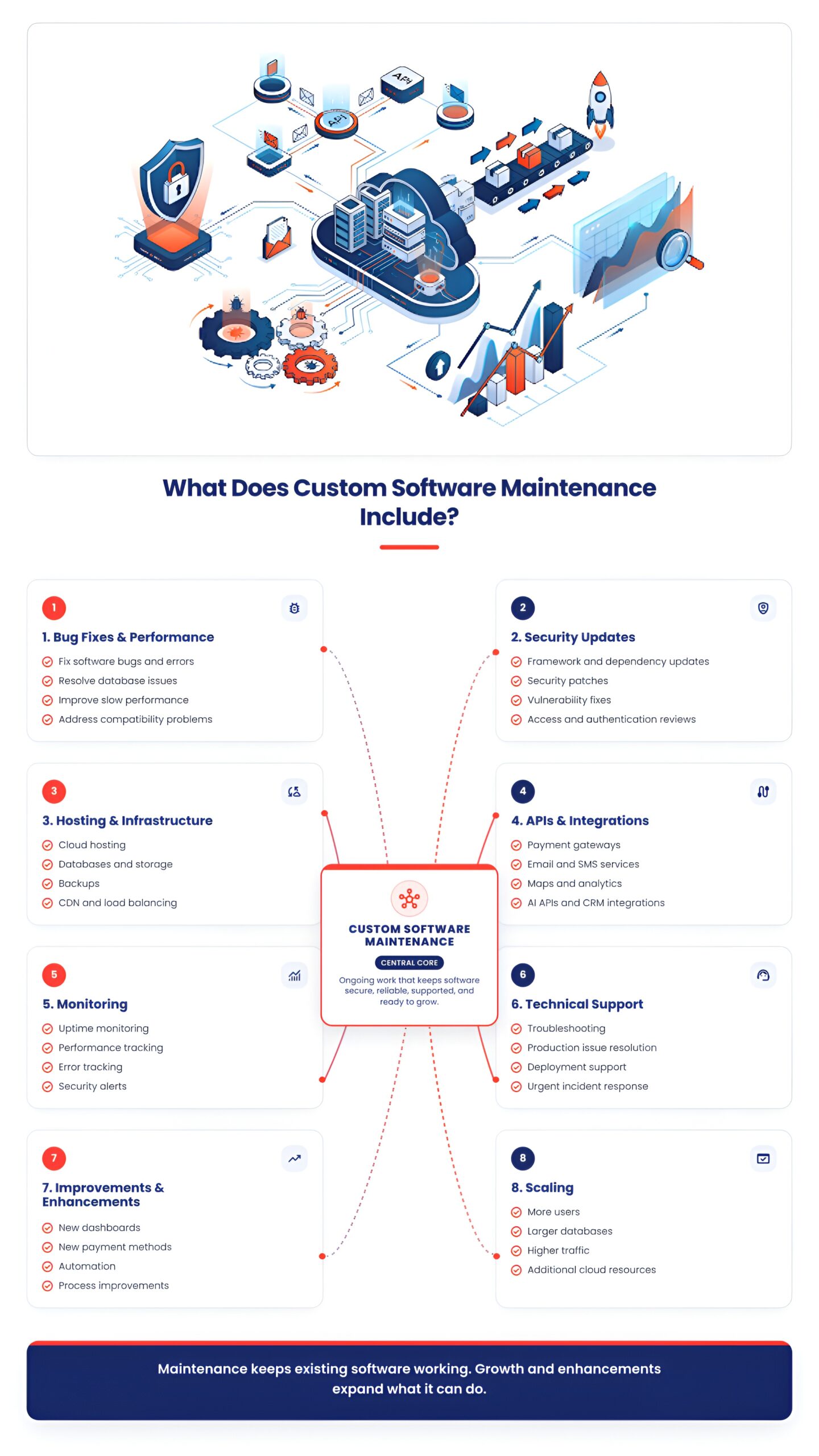
Maintenance is not just one task. It includes several different types of work. Here are the main parts.
Bug Fixes & Performance Issues
Even well-built software can still have problems later. Maintenance work in this area includes:
- Fixing bugs in how the software works
- Solving errors that appear without warning
- Fixing problems in the database
- Improving slow or reduced performance
- Fixing issues caused by compatibility problems with newer systems
Needing bug fixes does not always mean your software was built poorly. Systems around your software change all the time: operating systems update, other tools update, user habits change, and these changes can create new problems even in good software.
Security Updates & Vulnerability Patching
Security is one of the most important parts of maintenance. This includes:
- Updating the framework your software is built on
- Updating libraries and other dependencies
- Applying security patches
- Fixing security weaknesses (vulnerabilities)
- Reviewing who has access to what
- Improving authentication and login security
- Managing SSL/TLS certificates where needed
Security maintenance should not be treated as something extra you can skip. It should be treated as a normal, ongoing part of running your software.
Hosting & Infrastructure Costs
Businesses also need to budget for the systems that keep the software running, such as:
- Cloud hosting
- Dedicated servers
- Databases
- Storage
- Backups
- Bandwidth
- Content delivery networks (CDNs)
- Load balancing
- Disaster recovery systems
Here’s the difference: hosting is the cost of running your software, while maintenance is the work needed to keep it functioning correctly. These two often appear together in your overall post-launch budget, but they are not the same expense.
Third-Party APIs & Integrations
Most custom software connects to outside tools and services, such as:
- Payment gateways
- Maps or location services
- Email and SMS tools
- Login and authentication providers
- Analytics tools
- AI-based APIs
- CRM systems
- Communication tools
These connections also come with ongoing costs. Prices for APIs can change. Some APIs are deprecated and eventually discontinued and need to be replaced. Others require version upgrades. Integrations can also fail and need fixing. Many of these are usage-based, meaning you pay more as your usage grows. This is one of the most overlooked costs when businesses plan their first software budget.
Feature Updates & Software Improvements
There is a clear difference between maintenance and enhancement:
- Maintenance means keeping your existing features working correctly.
- Enhancement means adding new features or expanding what your software can do.
Examples of enhancement include:
- Adding a new dashboard
- Adding a new payment method
- Adding new reporting tools
- Redesigning how a process works
- Adding automation
- Adding mobile features
Because enhancement is different from maintenance, it should usually be planned and budgeted separately.
Monitoring & Performance Management
Monitoring means keeping an eye on your software so you can catch problems early, before they turn into bigger issues. This includes:
- Uptime monitoring (checking if your software is online)
- Performance monitoring
- Error tracking
- Server monitoring
- Database monitoring
- Security monitoring
- Automatic alerts when something looks wrong
Good monitoring often helps businesses fix small issues before users even notice them.
Technical Support
Support means having someone available to help when something goes wrong. This can include:
- Troubleshooting problems
- Fixing production issues
- Handling deployment problems
- Responding to bugs reported by users
- Solving integration problems
- Handling urgent, time-sensitive issues
Support can come in different forms, such as:
- Occasional (ad hoc) support
- Support billed by the hour
- A fixed monthly support plan
- Support based on a Service Level Agreement (SLA), which defines specific response and service-level targets
The right support model depends on how important uptime and quick fixes are for your business.
Scaling as User and Data Volumes Grow
As more people use your software or as the amount of data it stores grows, your infrastructure may need to change. This can happen because of:
- More users
- More transactions
- Larger databases
- More website or app traffic
- More storage needed
- Higher use of APIs
To handle this growth, businesses may need:
- Server upgrades
- Database improvements
- Caching systems
- Load balancing
- More cloud resources
- Changes to the software’s architecture
Scaling costs are usually not part of routine maintenance. They are more often tied to business growth and should be planned as separate development or operational costs.
Need Help Estimating Your Software Maintenance Costs?
Our custom software development team can help you assess your software’s infrastructure, integrations, security requirements, and ongoing support needs.
What Factors Affect Custom Software Maintenance Costs?
Several things influence how much you will spend each year on maintenance:
- Software Complexity: A simple internal tool usually needs less maintenance than a large platform with many features and modules.
- Number of Users: More users often mean you need more infrastructure, more monitoring, and more support.
- Number of Integrations: Every outside tool your software connects to is another thing that may need updates, fixes, or ongoing attention.
- Technology Stack: Some frameworks and tools need frequent updates. Others eventually stop being supported and need to be replaced.
- Security Requirements: Software that handles sensitive data, like customer or financial information, usually needs more frequent security work.
- Infrastructure: Your cloud setup, databases, storage, and traffic levels all affect how much you spend regularly.
- Support Requirements: 24/7 support with strict response times typically costs more than occasional help when something breaks.
- Frequency of Updates: Software that changes and grows quickly will usually need more ongoing development work.
How to Budget for Custom Software Maintenance
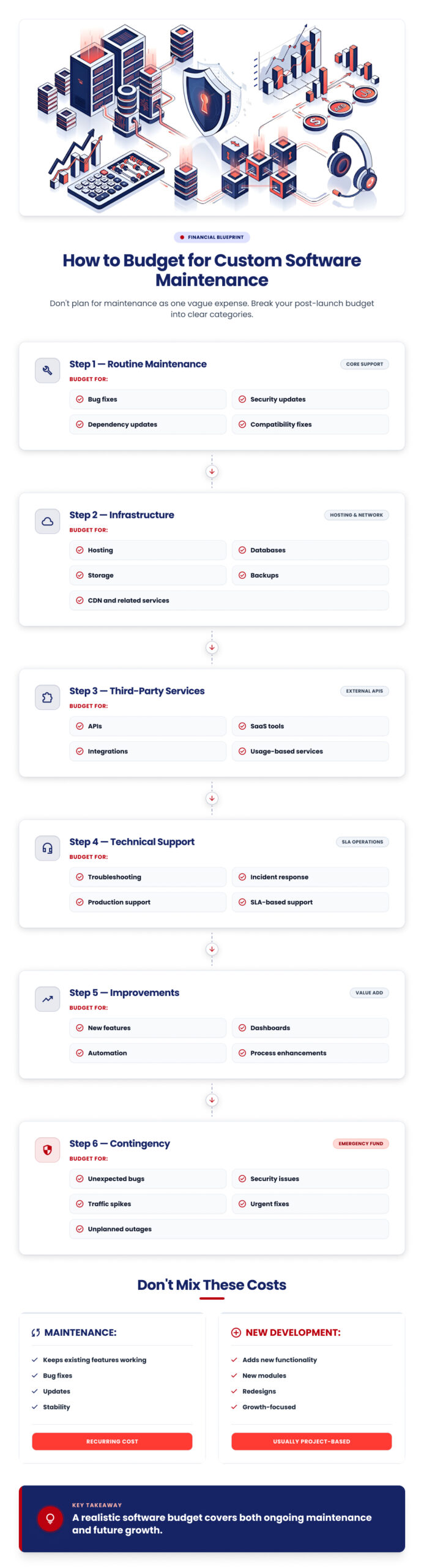
Instead of setting aside one general maintenance amount, it’s smarter to break your post-launch budget into clear categories:
1. Routine maintenance: Bug fixes, updates, and general upkeep.
2. Infrastructure: Hosting, databases, storage, backups, and related services.
3. Third-party services: APIs, SaaS tools, and usage-based services.
4. Support: Technical help and incident response.
5. Improvements: New features and enhancements.
6. Contingency: Unexpected bugs, security issues, traffic spikes, or urgent fixes.
Building your budget around these specific categories, instead of one vague number, gives you a much more realistic picture of what your software will actually cost to run.
Maintenance vs. New Development: What’s the Difference?
Businesses often confuse these two, which can lead to unexpected costs or disagreements with a development team. Here’s a simple comparison:
| Maintenance | New Development |
|---|---|
| Keeps existing features working | Builds new features or functionality |
| Includes bug fixes and updates | Includes new modules, tools, or redesigns |
| Usually covered under a maintenance agreement | Usually quoted and billed separately |
| Focused on stability and reliability | Focused on growth and new capability |
| Ongoing, recurring cost | Project-based cost |
Because contracts can define “maintenance” differently, it’s important to clarify this distinction directly with your development partner before starting work.
How Often Does Custom Software Need Maintenance?
Maintenance needs change over time, and different maintenance activities occur at different frequencies.:
Continuous
- Monitoring
- Backups
- Security monitoring
- Incident response
Monthly or Quarterly
- Dependency updates
- Performance reviews
- Infrastructure reviews
- Security checks
Periodically (less often)
- Framework upgrades
- Architecture improvements
- Infrastructure scaling
- Major feature enhancements
No single fixed schedule works for every business. Your actual maintenance rhythm will depend on how your software is built and how it is used.
How to Reduce Long-Term Software Maintenance Costs
While maintenance can’t be avoided completely, there are ways to keep it more affordable:
- Build with maintainability in mind from the very start; this starts with choosing the right software developmentpartner for the build itself
- Document the codebase and architecture clearly, so future work is easier
- Keep dependencies updated regularly instead of letting them fall behind
- Monitor application performance so problems are caught early
- Automate testing and deployments to reduce manual errors
- Use scalable infrastructure that can grow without a full rebuild
- Review third-party dependencies regularly to avoid surprises
- Address technical debt early, before it becomes expensive to fix
- Maintain reliable backups to avoid costly data loss
- Work with a clearly defined maintenance agreement, so expectations are clear from day one
Questions to Ask Your Software Development Partner About Maintenance
Before signing any agreement, ask questions like:
- What exactly is included in the maintenance agreement?
- Are bug fixes included?
- Are security updates included?
- Is hosting included, or billed separately?
- How are third-party API costs handled?
- What counts as a new feature versus routine maintenance?
- Is technical support included?
- What are the response times for critical issues?
- Is monitoring included?
- How are infrastructure scaling costs handled?
- What happens if the development team changes?
- How is technical debt managed over time?
Clear answers to these questions will help you choose a development partner you can trust for the long term.
Final Thoughts
The cost of launching your software is only one part of the full financial picture. A realistic, long-term budget should also account for maintenance, security, hosting, infrastructure, integrations, support, monitoring, improvements, and scaling.
Planning for these costs from the beginning helps you avoid financial surprises later and keeps your software running smoothly for years to come.
Planning a Custom Software Project?
Build your budget around both development and long-term maintenance. Talk to our custom software development team about the expected costs of building, maintaining, and scaling your solution.
FAQs
What percentage of development cost should be budgeted for maintenance?
There is no universal percentage that works for everyone. Instead of relying on a fixed number, base your estimate on your software’s actual operating and support needs.
What is included in software maintenance?
Maintenance generally includes bug fixes, security updates, dependency updates, compatibility fixes, performance improvements, and other work needed to keep existing features running properly.
Is hosting part of software maintenance?
Not exactly. Hosting and infrastructure are operational costs, while maintenance is the work needed to keep the software functioning correctly. Both are part of your overall post-launch budget, but they are separate expenses.
Does software maintenance include new features?
Usually not. Adding new features is generally treated as an enhancement or new development, depending on your maintenance agreement.
How often should custom software be updated?
Security and dependency updates often need regular attention, while larger upgrades depend on your technology stack and business needs.